Main /
Home Page
A collection of jazz leadsheets and the option to change key and/or clef.
Using this site
You can see a list of the available tunes by selecting a leadsheet group for the side bar menu. Then click on the tune in the list to access that tune.
Tune page information
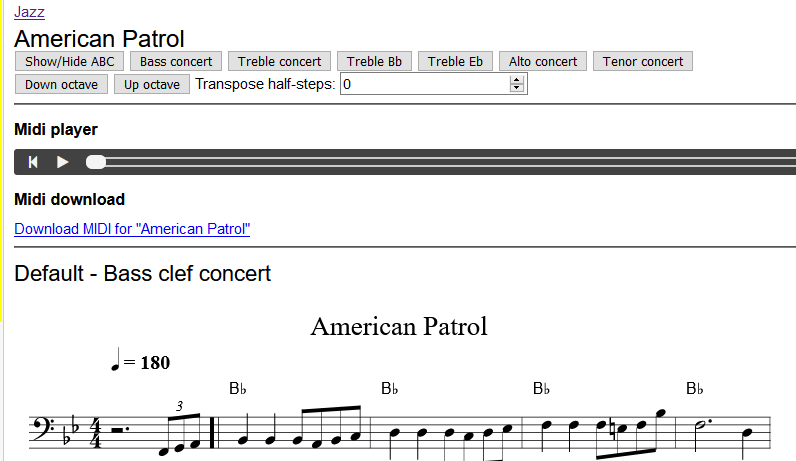
Below is a screen shot of an example tune page.
The page displays:
- The tune title
- Buttons - these make temporary changes to the sheet music display; the stored tune is not modified
- Buttons to change the clef - to see a version of the tune that may better suit your instrument
- Buttons to change the pitch - you can change the pitch up or down an octave, or use the transpose select value to change the key by setting the number of semitones change required; the sheet music will update to reflect the change.
- Advanced feature: Show/Hide ABC button will display the content of the tune in ABC Notation. You can make temporary edits to the tunes in the edit window and play/print the resulting changes, HOWEVER any changes you make are not saved!
- A Midi player - is provided to allow you to listen to the tunes HOWEVER it does not offer niceties of style such as swing notes or chord varitions, it's provided as it can help identify errors with data entry.
- A Midi file download link - you can download a Midi file for the tune
- The sheet music - each tune may contain the melody line and/or the chords.
Printing
You can then use the print menu option to get a printer friendly version that can be printed (NOTE: When printing check your margins are set to minimal values to ensure that the staves are not cut off)
IMPORTANT NOTE: we cannot be held responsible for any errors or omission in these leadsheets - they will happen - but in spite of this we hope that this site is useful.